





User behavior analysis is a fundamental component of web analytics that examines how visitors navigate and interact with websites. This analysis provides quantifiable data on user actions, including page visits, click patterns, session duration, and conversion paths. By tracking these metrics, organizations can identify specific areas where users encounter difficulties or abandon their intended actions.
For example, high cart abandonment rates often correlate with complex checkout processes, unexpected shipping costs, or security concerns regarding payment systems. Web analytics tools measure user behavior through multiple data points beyond basic page views and clicks. These include scroll depth, time spent on specific page sections, mouse movement patterns, and form completion rates.
Heat mapping technology reveals which page elements receive the most attention, while user session recordings provide detailed insights into navigation patterns. This comprehensive data collection enables businesses to identify friction points in the user journey and optimize website functionality accordingly. Behavioral segmentation divides users into distinct groups based on their interaction patterns, enabling targeted optimization strategies.
Common segments include new versus returning visitors, mobile versus desktop users, and high-value versus low-engagement customers. Each segment typically exhibits different behavioral characteristics that require specific approaches. For instance, mobile users may have shorter session durations and different content preferences compared to desktop users, necessitating responsive design adjustments and mobile-optimized content strategies.
Key Takeaways
- Understanding and analyzing user behavior is crucial for optimizing website performance.
- Tracking metrics like traffic, bounce rates, and conversion rates helps identify areas for improvement.
- Tools such as heatmaps and click pattern analysis provide insights into user interactions.
- Studying user navigation and time spent on pages reveals engagement levels and content effectiveness.
- Continuous evaluation and adjustments enhance overall user experience and drive better results.
Analyzing Website Traffic
Website traffic analysis is a fundamental component of digital marketing that involves examining the volume and sources of visitors to a website. This analysis provides valuable insights into how effectively a website attracts and retains users. Tools such as Google Analytics offer comprehensive data on traffic sources, including organic search, paid advertising, social media, and direct visits.
By understanding where traffic originates, businesses can allocate resources more effectively and optimize their marketing strategies to focus on the most productive channels. In addition to tracking the quantity of traffic, it is equally important to analyze the quality of that traffic. Not all visitors are created equal; some may have a higher likelihood of converting than others.
For instance, users arriving from targeted ad campaigns may be more inclined to make a purchase compared to those coming from general search queries. By segmenting traffic data based on user demographics, behavior, and source, businesses can identify high-value segments and tailor their marketing efforts accordingly. This targeted approach not only improves conversion rates but also enhances the overall return on investment for marketing campaigns.
Identifying Popular Pages

Identifying popular pages on a website is crucial for understanding what content resonates most with users. Popular pages often reflect the interests and needs of the audience, providing insights into what drives engagement and conversions. By analyzing page views, time spent on each page, and user interactions, businesses can pinpoint which content is performing well and which may need improvement.
For example, a blog post that consistently attracts high traffic may indicate a strong interest in a particular topic, suggesting that further content in that area could be beneficial. Furthermore, popular pages can serve as benchmarks for content strategy. By examining the characteristics of high-performing pages—such as their layout, tone, and call-to-action elements—businesses can replicate successful elements across other areas of their site.
This practice not only enhances overall site performance but also ensures that users have access to content that meets their needs. Additionally, understanding which pages are popular can inform decisions about resource allocation for content creation and marketing efforts, allowing businesses to focus on areas with the highest potential for engagement.
Tracking User Interactions
Tracking user interactions is an essential aspect of understanding how visitors engage with a website. This includes monitoring actions such as clicks on buttons, form submissions, video plays, and downloads. By capturing this data, businesses can gain insights into user preferences and behaviors that go beyond simple page views.
For instance, if analytics reveal that users frequently click on a specific call-to-action button but do not complete the desired action, it may indicate that the button’s placement or messaging needs to be optimized. Moreover, tracking user interactions allows businesses to assess the effectiveness of various elements on their site. A/B testing is a common method used to compare different versions of web pages or elements to determine which performs better in terms of user engagement and conversion rates.
For example, by testing two different headlines for a landing page, businesses can identify which version leads to higher click-through rates or conversions. This data-driven approach enables continuous improvement of the website’s design and functionality, ultimately enhancing the user experience.
Monitoring Conversion Rates
| Metric | Description | Typical Value | Importance |
|---|---|---|---|
| Average Session Duration | Average time a user spends on the website per visit | 2-5 minutes | High – indicates user engagement |
| Bounce Rate | Percentage of visitors who leave after viewing only one page | 40-60% | High – lower is better, indicates content relevance |
| Pages per Session | Average number of pages viewed during a session | 3-5 pages | Medium – shows depth of user interaction |
| New vs Returning Visitors | Ratio of first-time visitors to repeat visitors | 60% new / 40% returning | Medium – helps understand audience loyalty |
| Conversion Rate | Percentage of visitors completing a desired action (e.g., sign-up, purchase) | 2-5% | High – measures effectiveness of website goals |
| Exit Rate | Percentage of users who leave the site from a specific page | Varies by page | Medium – identifies problematic pages |
| Click-Through Rate (CTR) | Percentage of users who click on a specific link or call-to-action | 1-3% | High – measures engagement with content |
| Load Time | Average time it takes for a page to fully load | 2-3 seconds | High – impacts user experience and SEO |
Monitoring conversion rates is a vital metric for evaluating the effectiveness of a website in achieving its goals. A conversion can take many forms—such as completing a purchase, signing up for a newsletter, or downloading a resource—and tracking these actions provides insight into how well the site meets its objectives. High conversion rates typically indicate that users find value in what is being offered and are willing to take action.
Conversely, low conversion rates may signal issues with the website’s design, content, or overall user experience. To effectively monitor conversion rates, businesses must establish clear goals and track relevant metrics over time. This involves setting up conversion tracking within analytics tools to measure specific actions taken by users.
For example, an e-commerce site might track the percentage of visitors who complete a purchase after adding items to their cart. By analyzing this data regularly, businesses can identify trends and make informed decisions about where to focus their optimization efforts. Additionally, understanding the factors that influence conversion rates—such as seasonal trends or changes in user behavior—can help businesses adapt their strategies to maximize results.
Utilizing Heatmaps
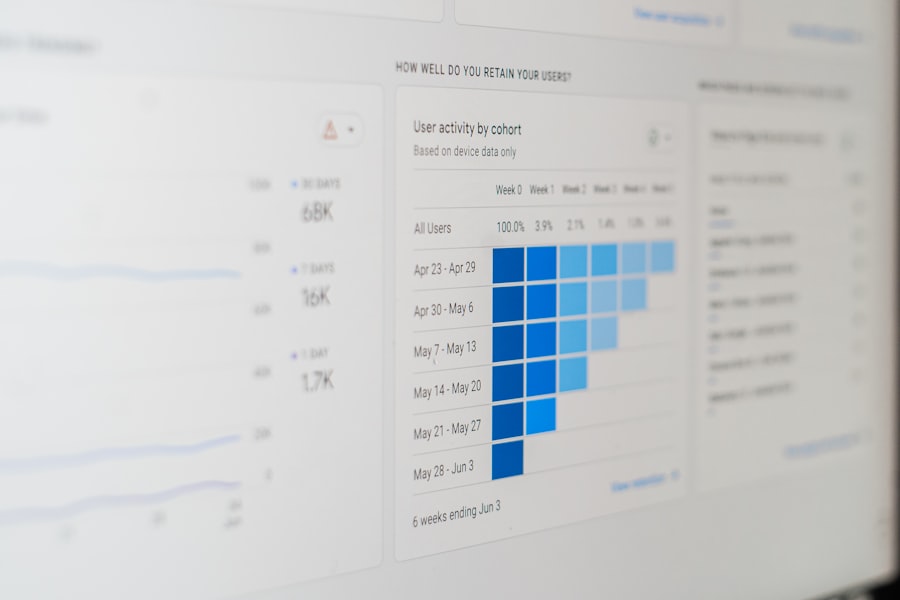
Heatmaps are powerful visualization tools that provide insights into user behavior by illustrating where visitors click, scroll, and hover on a webpage. By using heatmaps, businesses can gain a clearer understanding of how users interact with their site’s layout and design elements. For instance, a heatmap may reveal that users predominantly click on certain areas of a page while ignoring others entirely.
This information can be invaluable for optimizing page layouts and ensuring that important content is easily accessible. In addition to click heatmaps, scroll heatmaps offer insights into how far down a page users typically scroll before losing interest. If data shows that most users only scroll halfway down a long article or landing page, it may indicate that key information should be placed higher up on the page to capture attention more effectively.
By leveraging heatmaps in conjunction with other analytics tools, businesses can create more intuitive designs that enhance user engagement and drive conversions.
Examining Click Patterns
Examining click patterns is an essential part of understanding how users navigate through a website. Analyzing where users click most frequently can reveal valuable insights into their interests and intentions. For example, if analytics show that users are consistently clicking on links leading to product pages but not completing purchases, it may suggest that there are barriers in the purchasing process that need to be addressed.
Understanding these patterns allows businesses to make data-driven decisions about website design and content placement. Additionally, click patterns can help identify potential navigation issues within a site. If users are clicking on elements that are not intended to be interactive or are struggling to find key information due to poor navigation structure, it may lead to frustration and increased bounce rates.
By closely monitoring these patterns over time and making adjustments based on user behavior, businesses can create a more seamless browsing experience that encourages exploration and engagement.
Assessing Bounce Rates
Bounce rates are an important metric in web analytics that measures the percentage of visitors who leave a site after viewing only one page without taking any further action. A high bounce rate may indicate that users are not finding what they expected or that the content does not meet their needs. For instance, if visitors land on a landing page but quickly exit without exploring other areas of the site, it could suggest that the page lacks compelling content or clear calls-to-action.
To assess bounce rates effectively, businesses should analyze them in conjunction with other metrics such as average session duration and pages per session. A high bounce rate coupled with low time spent on page may signal significant issues with content relevance or user experience. Conversely, if users spend considerable time on a single page before bouncing, it may indicate that while they found the content engaging, they did not find what they were looking for next.
By identifying these nuances in bounce rate data, businesses can implement targeted strategies to improve user retention and encourage deeper exploration of their site.
Studying User Navigation
Studying user navigation patterns provides insights into how visitors move through a website and interact with its various elements.
For example, if analytics reveal that users frequently navigate from product pages to related articles but rarely return to the homepage, it may suggest that the homepage lacks engaging content or clear pathways for exploration.
Additionally, analyzing user navigation can help identify common pathways taken by visitors before converting or exiting the site. By mapping out these journeys, businesses can pinpoint areas where users may encounter obstacles or drop off in the conversion process. This information is invaluable for refining navigation menus and improving internal linking strategies to guide users toward desired actions more effectively.
Evaluating Time on Page
Evaluating time spent on individual pages is an important metric for assessing user engagement and content effectiveness. A longer time on page often indicates that users find the content valuable or engaging enough to read thoroughly. Conversely, short time spent on pages may suggest that users are not finding what they expected or are quickly losing interest in the material presented.
For instance, if an article has a high bounce rate but also shows long average time spent on page, it could imply that while users are engaged with the content itself, they struggle to find related information or next steps. To gain deeper insights from time-on-page metrics, businesses should consider segmenting this data by different audience demographics or traffic sources.
Understanding these differences allows businesses to tailor content strategies accordingly—creating more engaging experiences for new visitors while providing deeper insights for returning customers.
Improving User Experience
Improving user experience (UX) is an ongoing process that requires continuous analysis and adaptation based on user behavior data. A positive UX is essential for retaining visitors and encouraging them to take desired actions on a website. By leveraging insights gained from various analytics tools—such as tracking user interactions, monitoring conversion rates, and assessing bounce rates—businesses can identify pain points within their sites and implement targeted improvements.
For instance, if analytics reveal high bounce rates on mobile devices compared to desktop users, it may indicate issues with mobile responsiveness or usability. In such cases, optimizing mobile layouts and ensuring fast loading times can significantly enhance UX for mobile visitors. Additionally, gathering qualitative feedback through surveys or usability testing can provide further insights into user preferences and expectations.
By prioritizing UX improvements based on data-driven insights and user feedback, businesses can create more engaging websites that foster loyalty and drive conversions over time.
FAQs
What are website behavior insights?
Website behavior insights refer to the data and analysis related to how visitors interact with a website. This includes tracking actions such as clicks, page views, time spent on pages, navigation paths, and other user interactions to understand user behavior and improve website performance.
Why are website behavior insights important?
They help website owners and marketers understand user preferences, identify usability issues, optimize content and design, increase engagement, and ultimately improve conversion rates and customer satisfaction.
How are website behavior insights collected?
Insights are typically collected using analytics tools like Google Analytics, heatmaps, session recordings, and user feedback surveys. These tools track user interactions and provide data for analysis.
What types of data are included in website behavior insights?
Data can include page views, bounce rates, click patterns, scroll depth, navigation paths, session duration, conversion rates, and user demographics, among others.
Can website behavior insights improve user experience?
Yes, by analyzing how users interact with a website, businesses can identify pain points, streamline navigation, personalize content, and enhance overall usability to provide a better user experience.
Are website behavior insights useful for marketing strategies?
Absolutely. They provide valuable information about customer interests and behaviors, enabling marketers to tailor campaigns, target audiences more effectively, and measure the success of marketing efforts.
Is user privacy considered when collecting website behavior insights?
Yes, responsible data collection complies with privacy laws such as GDPR and CCPA. Websites often use anonymized data and obtain user consent before tracking behavior to protect user privacy.
What tools are commonly used to analyze website behavior?
Popular tools include Google Analytics, Hotjar, Crazy Egg, Adobe Analytics, and Mixpanel, each offering various features for tracking and visualizing user behavior.
How often should website behavior insights be reviewed?
Regular review is recommended, often monthly or quarterly, to monitor trends, assess the impact of changes, and continuously optimize the website based on user behavior.
Can website behavior insights predict future user actions?
While they cannot predict with certainty, analyzing patterns and trends in user behavior can help anticipate future actions and guide strategic decisions.




0 Comments